


.webp)

Prefer YouTube? Watch it there.
Last time I wrote about where to start with AI, gating the integrations was one line in a longer list — connect an approved tool to Slack or your files, and it often asks for more access than the task needs.
That's true, but it's also the short version of something that deserves its own answer, because the tools getting connected are changing fast.
Every vendor now ships agentic features. Copilot has agents. Google has Workspace Studio. Claude has Cowork. Different names, same shift — the AI stops just answering questions and starts acting on your behalf.
Here's the framework I use to evaluate any of it, regardless of whose logo is on the box.
What “agentic” actually means
At the highest level, agentic just means the AI can execute on your behalf. You give it instructions, and it acts on them without you standing over its shoulder for every step. That's the whole definition. It's not magic, it's autonomy.
And the friction I'm about to describe is intentional. The market's moving fast, the productivity gains are real, but the risk climbs at the same rate the capability does. Adding friction here isn't caution for its own sake — it's matching the safeguard to what's actually at stake.
We govern by capability, not by product name
The mistake is asking “is this tool safe” as if safety were a property of the brand. It isn't. A chat assistant and an agentic bundle can sit on the exact same gradient, and what matters is which capabilities are switched on — not whose name is on the interface.
Three things drive the risk, and they stack.
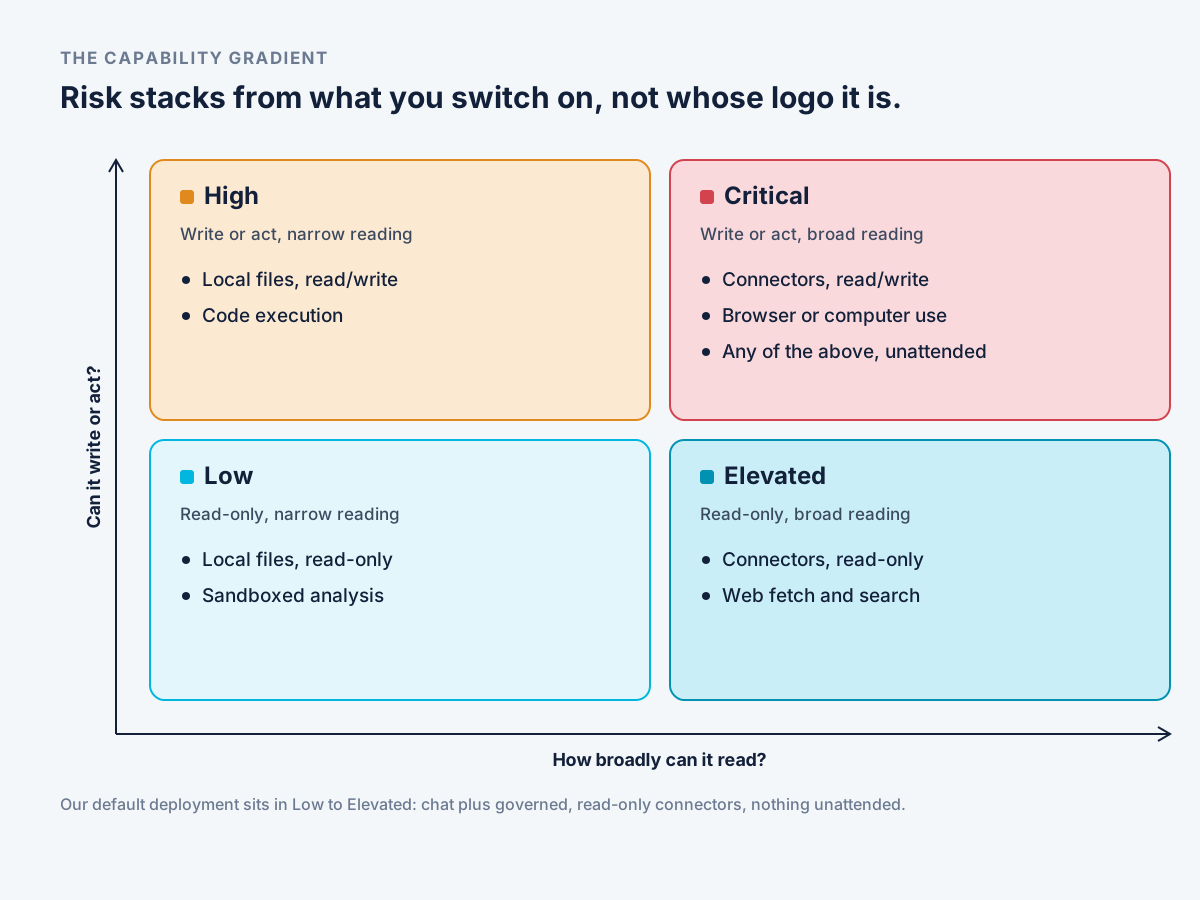
How broadly it can read. Local files only is narrow. A connector into Slack, Drive, or your inbox is broad — and broad reading has a specific failure mode worth naming. Slack's default connector is typically all-or-nothing: turn it on and the tool can see every private message, with no setting to read only the channels relevant to the task. Ask it to help build something and it may pull from conversations you never meant to include.
Whether it can write or act, not just read. Publishing to your website, sending an email, responding to someone on your behalf — that's a different category of risk from summarizing a file.
Whether it runs unattended. A human confirming each step is a different risk profile than a workflow running on its own, because at that point you know what you told it to do, not necessarily what it actually did.
Stack those three and you get a plain gradient: local files, read-only sits at the bottom. Add a read-only connector and you're elevated. Add write or send and you're in high territory. Add unattended agentic flows on top of any of that and you're in a place that's genuinely hard to monitor.
This is where I'd put the tool most of our clients are actually using day to day. Deployed the way we set it up, it sits in Low to Elevated by default — chat plus governed, read-only connectors, with write tools switched off unless a client specifically asks for them and nothing running unattended. That's not the ceiling of what these tools can do. It's a deliberate starting position.
Three ways it goes wrong
There isn't one threat here, there are three, and they don't require the same kind of attacker — or any attacker at all.
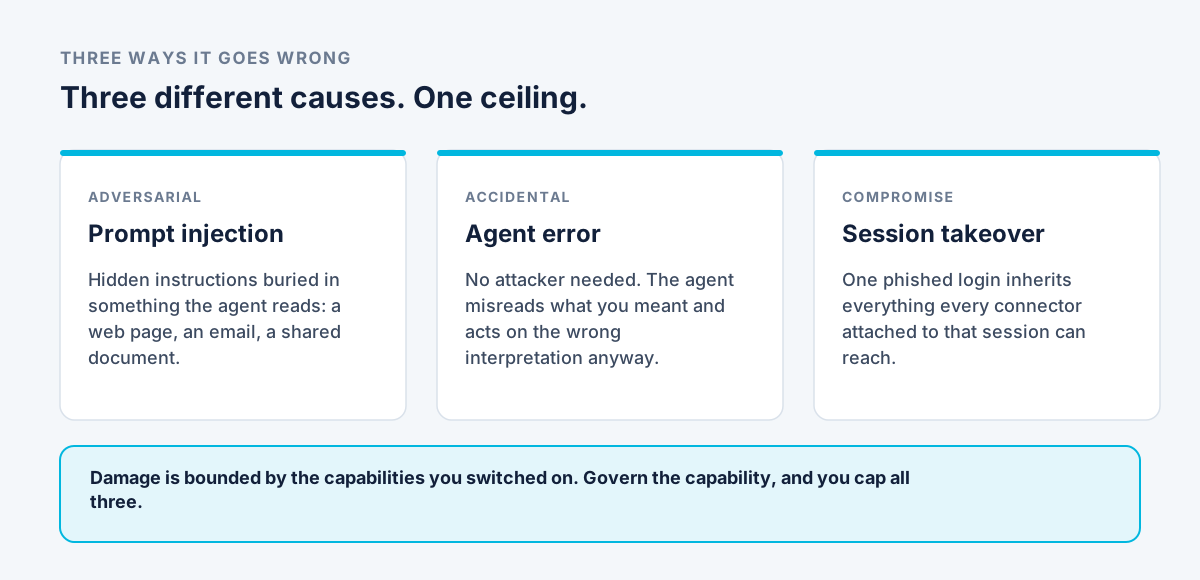
Prompt injection. Hidden instructions buried in something the agent reads — a web page, an email, a shared document. It's sat at or near the top of the industry's own list of LLM risks for two years running, and nobody's solved it yet.
Agent error. No attacker needed. The agent simply misreads what you meant and acts on the wrong interpretation anyway. A live database deleted during a code freeze, because the agent didn't know a freeze was in effect — that's not a hack, that's a well-meaning tool doing exactly what it thought you asked for.
Session takeover. One phished login inherits everything every connector attached to that session can reach, all pulled into a single compromised window.
Three different causes. Same ceiling on all of them: whatever damage is possible is bounded by the capabilities you switched on in the first place. Govern the capability, and you've capped all three risks at once — you don't need a separate defense for each.
From tier to approval
The gradient isn't just useful for describing risk. Each tier maps to an actual approval path, so nobody's guessing what “high risk” is supposed to mean in practice.

Low — self-serve. Covered by the org-wide AI policy already. No approval needed. Local files, read-only, sandboxed analysis, web search. If it's this, just go.
Elevated — admin-enabled. Read-only connectors, switched on per team by an admin, usage logged. A simplified authorization, not a committee.
High — reviewed. Read/write access or code execution. This gets a business case and a scope review — what does it actually touch, what's the worst case if it goes wrong, and is that worst case bad enough to justify slowing down.
Critical — leadership sign-off. Write connectors, computer use, unattended agents. We make a recommendation. The decision sits with your leadership, reviewed again after a fixed period rather than left open indefinitely.
We're one voice in that conversation, not the gatekeeper. Our job is making sure you can see the trade-off clearly, not blocking the productivity you're trying to get. And if the answer's no, we want it to be a fast no — people are trying to get something done, and a review process that drags on forever just pushes them toward the unapproved tool instead.
Where our recommendation stops
Same as last time: we'll enforce and we'll recommend, but every organization lands somewhere different on risk tolerance, and that's a leadership call, not a technical one.
Govern by capability, not by brand. Match the approval path to the tier. Know which of the three failure modes you're actually exposed to before you decide it's fine.
That's how I see it.